This is default featured slide 1 title

Go to Blogger edit html and find these sentences.Now replace these sentences with your own descriptions.

This is default featured slide 2 title

Go to Blogger edit html and find these sentences.Now replace these sentences with your own descriptions.

This is default featured slide 3 title

Go to Blogger edit html and find these sentences.Now replace these sentences with your own descriptions.

This is default featured slide 4 title

Go to Blogger edit html and find these sentences.Now replace these sentences with your own descriptions.

This is default featured slide 5 title

Go to Blogger edit html and find these sentences.Now replace these sentences with your own descriptions.

Thursday, 13 December 2012

Ninth week learnt about History of the Internet

When the original conceptual foundation of the Internet was laid back in the 50s, no one had the slightest idea of how far this project would go. At those insecure post-war times of alienation and deepening political division, the vision of the Internet as we see it today, was only a matter of science fiction dreaming. Starting as a military project in the United States, it quickly became very popular in several other countries. Now, several decades later, with the spread of the democratic lifestyle and the amazing technological progress, we all witness the existence of a parallel world of unlimited communication possibilities that occupies an increasing part of our daily routine with the sole purpose of facilitating our lives.


History of the Internet:


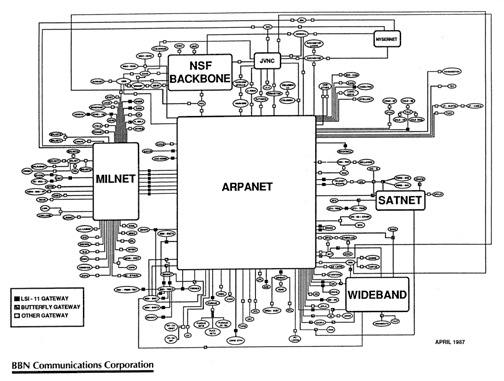
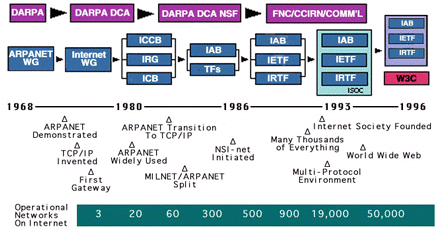
 Mid 1960:   Papers on “Packet Switching” emerge.

 End 1969s:   ARPA sponsors the development of a packet-switching network, called the
 ARPANET. First four nodes are UCLA, SRI, U. Utah, UCSB.

  1974:   The TCP/IP protocols and model are being proposed by Cerf/Kahn. 

  1980:   IPv4 is introduced.


  1983:   ARPANET adopts TCP/IP. At this time, the ARPANET has 200 routers. 

  1984:   NSF funds a TCP/IP based backbone network. This   backbone grows into the NSFNET,
which becomes the successor of the ARPANET.

 1995:   NSF stops funding of NSFNET. The Internet is completely commercial. 

Time line of the Internet:


Then we discussed about web page, browser and web engine.


Eighth week learnt about Microsoft Powerpoint


In week 8, Our lecturer showed us how to create one new slide and Insert any text, how to make slide more attractive, use the themes or background, use the custom animation to add effects on any text, to insert and work with pictures, to insert clip art, screenshots in slides.


Inserting a screen clipping from a window and Transition:
 
Task and working with video:  
Working with Video include the following task: Inserting video, Preview and re-size the video, Edit and format,
Formatting the
appearance of the video. Inserting video
and edit and format the video.


Our lecturer told us to prepared power point slides presentation is about social networking.
                                
                                   Table of Contact


Topic
Introduction
Advantages 
Disadvantages
Conclusion
 
We have to submit this power point  presentation Week Eleven and I think it will be interesting for us.


Wednesday, 12 December 2012

Seventh week learnt about Microsoft Excel

In week 7, We learnt about how to change row height and column width, Insert and delete rows and columns, wrap text in a cell and Marge cells. Our lecturer showed us how to make a chart and how to create
pivot table.
Formatting:


Creating Simple Formula:
To create Formula using the point and click Method:


Spark Lines:
Spark lines are miniature charts that fit into a single cell- Place a large number of them in your worksheets.


In week 7,We did class activity like quiz games in during class time and our lecturer divided three groups for that games. It was so interesting and finally our group won that games. After that he talked about Lab test 1..


Sunday, 18 November 2012

Sixth week learnt about Microsoft Office

Word Processing Skills: MS Word Basic
1st session

In week 6 we learnt about  Microsoft Office. Microsoft Office includes a wide variety of programs such as:


Microsoft Word, Microsoft Excel, Microsoft Access, Microsoft Outlook, Microsoft Publisher, Microsoft One Note, Microsoft Info Path, Microsoft SharePoint Workspace, Microsoft Communicator, Microsoft Web Apps.


Basic Text Operations

The basics of working with text includes seven components:

- Insert
- Delete
- Select
- Copy, cut and paste text
- Drag and drop text
- Find and Replace Text
- Save
- Printing

Word Processing Skills: MS word Advanced & Activity
2nd session & 3rd session

Advanced Microsoft Word


Styles and Templates


Customizing Tables and Creating Charts


Creating Mail Merge Documents


 Working with Hyperlink


Thursday, 15 November 2012

Fifth weeek MS Windows Operating System (latest version)

Anatomy of MS Windows OS
1st session

Our lecturer taught us about MS Windows 7.The lecturer told us that Microsoft created the operating system Windows in 1985. The latest is Windows 7 which was released in 2009. Then the lecturer told that decreasing Start Up and Shutdown times by 20 seconds, Go to Sleep and Resume faster, Use up less Memory, Pop up Search results faster, Reconnect to Wireless Network more quickly, Recognize USB devices faster are the aims of Windows 7.Then we learnt about the main elements of Windows 7.


  • Windows OS History                   
  • Microsoft Windows                                                     
  • Anatomy of Windows 7
   > Aero view 


          Aero Peek
          Aero Snap
          Aero Flip


          Aero Shake


          > Taskbar

          > Search
          > Libraries

          > Gadgets

MS Windows OS File Manangement
2nd session
  1. Windows 7 File Management
  1. Managing Files and  Folders
  1. Efficient File Management
  1. Types of Libraries
  • Documents
  • Pictures
  • Music
  • Videos 


     5. Search Options and Features   


Wednesday, 14 November 2012

Fourth Week on Networking Concepts

Basic Concepts of Networking
1st Session

It is simply a group of interconnected computers.
Example: Internet, ATM, home network


Major Network components:

-communication media
- Interconnecting device
- Computers
- networking software
- applications


Basic Networking Concepts:
1. Topology
2. Protocol
3. Architecture
                                             

Third week on Software and OS...

Software and Operating System
1st Session

Software drives the hardware with the data or instructions. It has 3 categories:

                                               
1. System Software
2. Application Software
3. Programming Language


Software Layers

It includes processes to link between the user and hardware.

Operating Systems


 It is the most important software in all computer systems. It is also called a platform program.
The functions of OS are following:

1. Starting and shutting down of a computer
2. Providing a user interface
3. Managing programs
4. Managing memory
5. Monitoring performance
6. Controlling a network
7. Configuring devices

User Interface

Two types:
1. GUI
2. Command-line interface

Utility Programs

These are used to improve the functions of a computer. OS includes some built-in UP, but most of the users buy these additionally.

Programming Languages
2nd Session

Programming language is a set of words, abbreviations and symbols that enables a programmer to communicate instructions to a computer.
- It is a tool to create & modify programs
- It is a language to communicate between user and computer

Generations of PL

1. Machine Language
2. Assembly Language
3. Procedural Language
4. Object-oriented Language
5. Natural Language

Application Software and Its Installation Procedures
3rd Session

Application Software improves four different sectors:

1. Business
2. Graphics and multimedia
3. Home, personal and educational task
4. Communications